Food & everyday life · Mainland China
How to order in Chinese restaurants without speaking Chinese
Many restaurants in China use table QR codes for ordering, often with a Chinese-only menu. Here’s how to translate the dishes, check portions and prices, and get help if the ordering page will not work.
By TravelPalPal · Updated October 21, 2026 · 7 min read
The short answer
First check whether the restaurant takes orders at the counter, with a server or through a table QR code. For a QR menu, scan with the app shown, confirm the table, choose dishes and check quantities before submitting. If the system will not accept your phone number or account, ask staff to take the order.
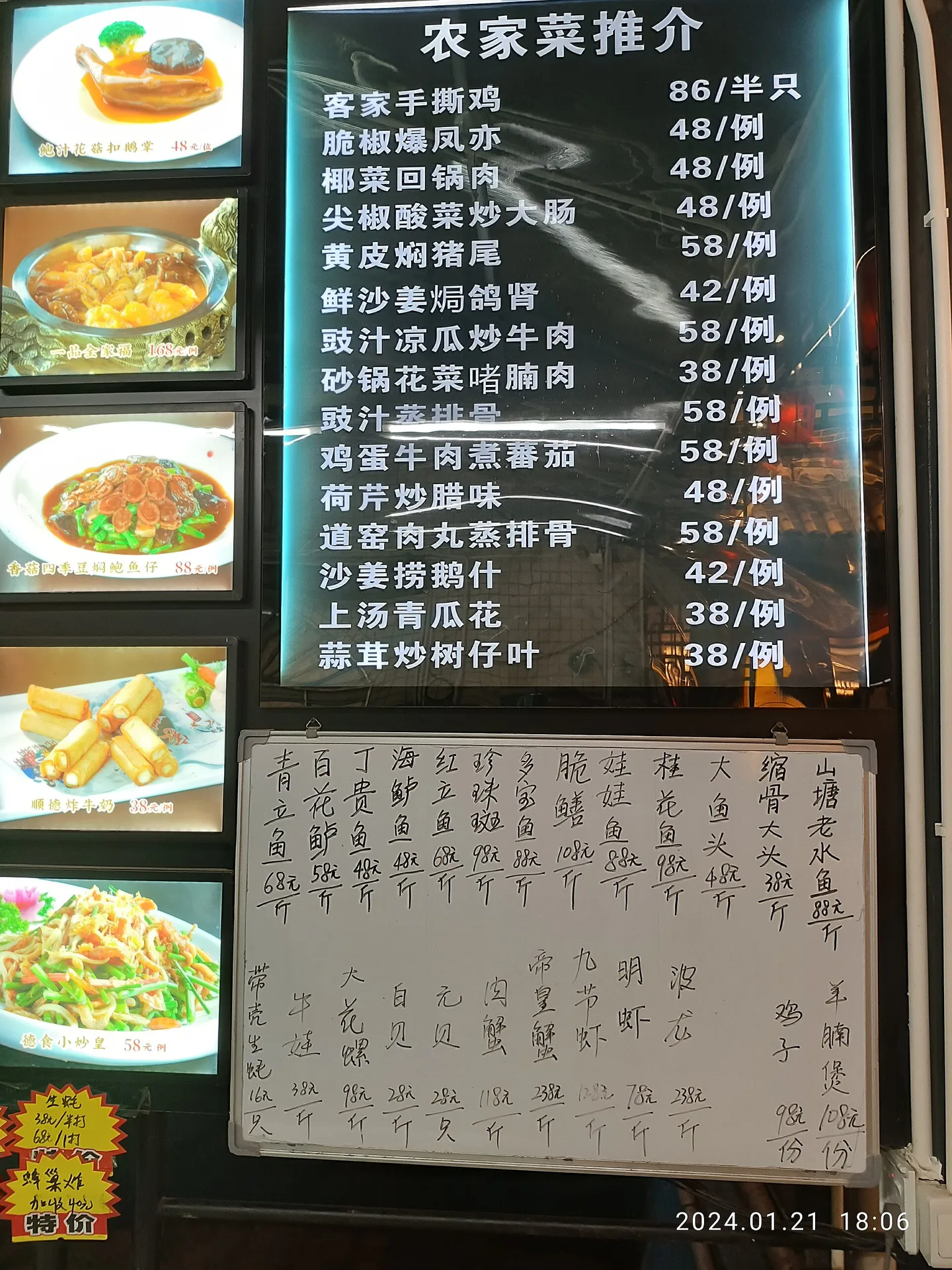
A menu board in Guangdong. Pictures, prices and units can tell you a lot even before translating the dish names.
Lau Hau Yatyue Tiger / Wikimedia Commons · resized · CC001
Ordering at the counter, with a server or by QR code
At a noodle shop or bakery, you may order and pay at the counter, then collect food when a number is called. At a sit-down restaurant, staff may seat you and bring a menu, a tablet or a table card.
Look at the words and app marks on the code. 扫码点餐 indicates ordering; 买单 or 支付 usually points towards paying. A membership or review code does something else again. Ask staff to point out the ordering code if several sit side by side. If the code opens a payment page, ask staff for the menu or ordering code.
| What you find | What to do next |
|---|---|
| Counter, wall menu or display case | Choose with the person taking orders, confirm the price and keep the collection number. |
| Server and printed menu | Point to the item or photograph, then confirm portions and options. |
| QR card or sticker on your table | Use the marked app and check that the menu belongs to this restaurant and table. |
| Self-service kiosk | Look for a language option and a staffed ordering route if payment or translation is unclear. |
02
How to open a restaurant’s QR-code menu
Open Scan in WeChat or Alipay according to the marks beside the code. Some restaurant codes work with both; others open only one mini-program. Your phone’s general camera can read a code, but the ordering page may still need to open inside the restaurant’s chosen app.
Check the restaurant name and table number when the page opens. If staff moved you after you first scanned, ask whether you need a different code. A menu can look perfectly normal while the basket is still attached to your old table.
Use an English or translation option where one is available. Otherwise, take a screenshot of the dish or menu page and open it in a translation app that can read images on your phone. Translate a section at a time so you can still match the price and photograph to the original item. It is easy to lose your place when translating the entire menu at once.
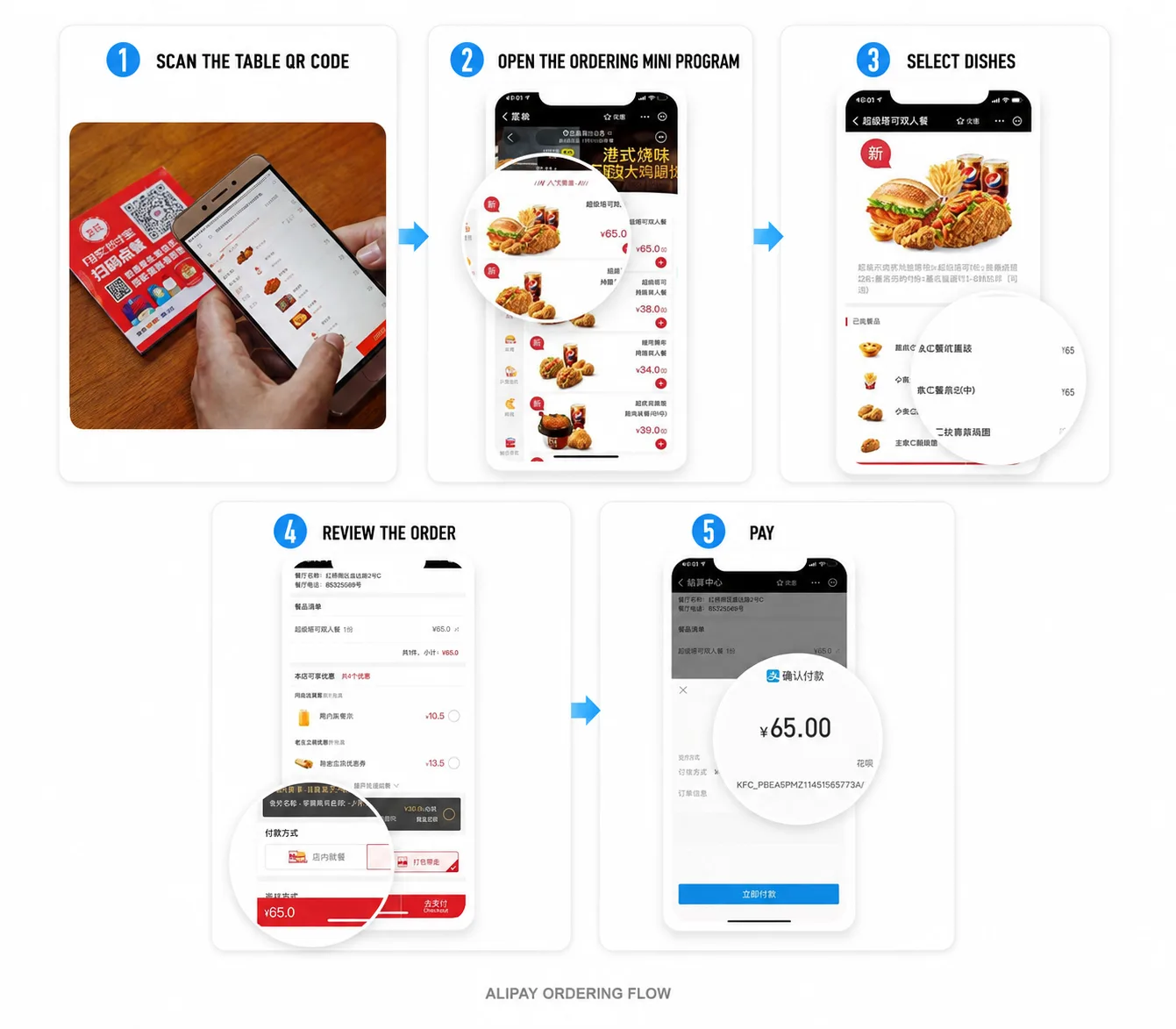
This Alipay/KFC example shows the mobile-menu stage: prices sit beside dishes and the plus controls add them to the basket. Other restaurants use different menus.
Restaurant app interface via Journey To China03
How to translate a Chinese menu and read prices
A dish photograph is a starting point, not a full ingredient list. Read the main ingredients and cooking style, then show the exact item to staff if the translation is odd. A poetic name may tell you less than the photograph or the ingredients below it. You can also point to a dish at the display counter and ask the staff to identify it on the menu.
Check whether the price is per portion, per person, per piece or by weight. In the photographed Guangdong menu, 例 marks a portion and 斤 marks a weight unit; one mainland jin is 500 grams. A fish listed by weight is not necessarily one whole fish for the printed amount. Ask the weight and total price before agreeing to it.
Look for choices after tapping a dish: small or large, dry or soup, hot or iced, spicy or mild, and paid extras. A plus button may open another options screen rather than adding a finished item immediately. If the basket is empty, an option you have not selected may be the reason.
Read the unit with the number: 半只 means half a chicken here, while 例 means a portion. The photo records this restaurant’s 2024 menu, not current prices for China generally.
Lau Hau Yatyue Tiger / Wikimedia Commons · resized · CC004
Portion sizes, spice levels and dietary requirements
For one person, a noodle bowl, rice dish or clearly described set meal is easier to judge than several sharing plates. A set can include a drink or side, so check before adding duplicates. At a shared-table restaurant, ask staff whether your chosen dishes are enough for the group and whether rice is ordered separately. You can start modestly and add another dish later.
Choose the spice level in the item options and confirm with staff when it matters. A restaurant’s “mild” still reflects its own cooking. Saying you prefer less chili is also different from saying you cannot eat a particular ingredient. If you avoid meat, check broths, sauces and toppings as well as the main photograph.
For an allergy, communicate the exact ingredient and seriousness to staff before ordering, using a clear translation if needed. Ask them to check with the kitchen, including preparation and shared equipment. A translated menu or a comment typed into the basket cannot establish that a dish is suitable. If the restaurant cannot give a clear answer, choose somewhere that can.
05
How to submit and confirm your food order
Review the table number, dishes, options, quantities and total. If several people scanned the same table code, check whether they are looking at one shared basket or separate orders. Decide who is submitting it so the table does not accidentally order the same meal twice.
Tap the final order or checkout control and read the next screen. Some systems send the food to the kitchen before payment; others wait until payment succeeds. Check for an order number or confirmation after submitting.
If nothing arrives, show the confirmation to staff. If there is no order record and you only see selected dishes, ask them to check the status before you submit again. At a counter-service restaurant, keep your pickup number and watch the collection screen.
Reviewing the basket and completing the final checkout are separate steps. Check the result after this screen; an item in the basket is not a kitchen confirmation.
Restaurant app interface via Journey To China06
What to do if the menu requires a Chinese phone number
If a mini-program insists on a mainland mobile number, tries to make you join a membership scheme or will not work with your account, show the screen to a server. Ask for a printed menu, a staff tablet or a manual order. A staff member can often enter the items while you point to pictures and confirm the price.
If staff cannot offer an ordering route that works, a nearby counter-service restaurant can be a simpler first meal. Save the more complicated setup for another time. Hotel delivery is a separate process because it also needs a delivery address and rider contact.
07
How to pay the restaurant bill
When you are ready to leave, open the order or ask for the bill. If you paid when submitting, show that payment record rather than paying the same items at the counter again. If you ordered first and pay later, check the items and total before completing the payment.
Ask about tea, tableware, extra sides or a service charge if they are unfamiliar. Do not assume everything placed on the table is included. Ordinary restaurant tipping is not expected, although a stated service charge is a separate item. Keep the receipt or payment record until you have checked the amount.
If the linked foreign card fails, check the message and ask about another accepted payment route, such as a different wallet or RMB cash. A table-ordering failure and a bank payment failure are different problems; show staff which screen you have reached so they can help with the right one.
Frequently asked questions
- Can WeChat translate every restaurant mini-program?
- Translation support depends on the page and app version. Use an available built-in translation, or translate a screenshot with a tool that supports saved images. Keep the original dish and price visible when asking staff to confirm.
- Can I order without WeChat or Alipay?
- Many restaurants can take an order at the counter or through staff, but some small outlets rely heavily on their app or kiosk. Ask before settling in. A visible menu and a working payment route matter more than a particular app.
- Is scanning the table code the same as ordering delivery?
- No. A table code normally connects an order to a table or collection point in that restaurant. Hotel delivery needs a delivery service, address and a way for the rider to contact you.
Before you travel: Ordering systems, translation, payment acceptance and phone-number prompts vary by restaurant. The interface images show an example, not a universal screen sequence. Confirm the order status, current price and any dietary requirements with the restaurant.