Payments · Mainland China
Alipay for foreigners: set up, pay & fix failed payments
From downloading the app to paying for your first coffee: the screens to look for, the fees to expect and the next step when a payment fails.
By TravelPalPal · Updated October 21, 2026 · 7 min read
Can foreigners use Alipay?
Link your foreign credit or debit card to pay in mainland China. You can use your home phone number, and you do not need a Chinese bank account or a prepaid wallet balance.
01
What you need to use Alipay with a foreign card
Have your passport, a bank card in your own name and your travel phone ready. You can register with your home mobile number; you do not need to open a Chinese bank account for card-funded purchases.
Keep access to SMS and your banking app while you travel. A data-only eSIM provides internet, but it does not receive messages sent to your home number. Set up Alipay before departure, while getting a verification code or calling your bank is still easy.
Alipay supports international card networks including Visa and Mastercard, plus American Express cards issued directly by Amex. Bring a second card from another issuer and some RMB cash as backup.
02
How to set up Alipay and link a foreign card
Download the standard Alipay app from your phone’s official app store. AlipayHK is a separate wallet. Choose English, then work through the steps below.
Open the official Alipay website- 1
Register with your phone number
Tap Sign up, select your country code and enter your mobile number. Enter the SMS verification code. Keep that number active throughout your trip.
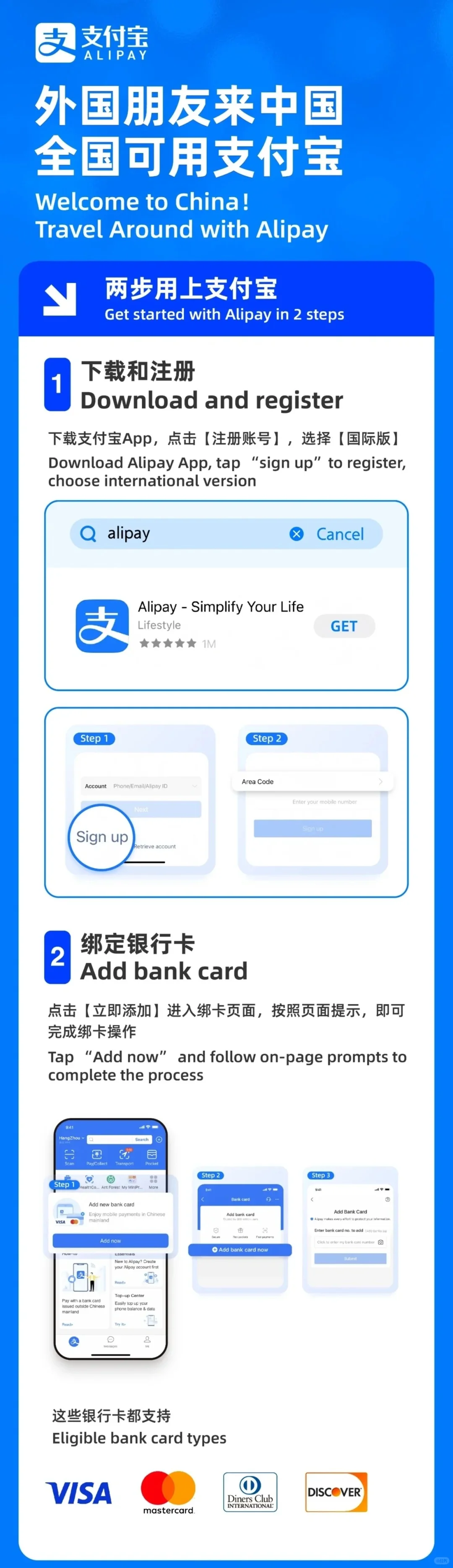
Choose Sign up, then select your country code and enter your phone number.
Open full-size tutorial - 2
Open Bank Cards and select Add bank card
Open Me → Bank Cards → Add Card. You can also use the Add now shortcut shown on the app’s home screen.
Use Add now on the home screen, or open Bank Cards and add your card.
Open full-size tutorial - 3
Enter your card details
Fill in the card number, expiry date, security code and requested cardholder details. Complete your bank’s authorization through SMS or its banking app.
- 4
Verify your identity with your passport
When prompted for identification, choose Passport and enter your details as shown in the document. Photograph the information page with all edges visible and no glare. Follow the face-check instructions on screen.
Before closing the app, check that your card is listed and finish any outstanding verification task. After arriving in mainland China, make a small purchase at a staffed checkout to learn the payment flow.
03
How to pay a shop with Alipay
At a café or shop, say ‘Alipay?’ or show the app. There are two ways to pay. The cashier’s scanner or the code on the counter will tell you which one to use.
- 1
Scan the shop’s payment code
Open Scan and aim at the merchant’s QR code. Check the merchant name, enter the price if asked, then choose your card and confirm the total.

You scan: open Scan and point your phone at the shop’s payment code.
Open full-size tutorial - 2
Show your payment code to the cashier
Open Pay/Collect and display your payment code. Check the selected card, hold the screen towards the cashier’s scanner and confirm that the transaction is complete.
They scan: open your payment code and show it to the cashier.
Open full-size tutorial
Use the live payment code in the app; do not save or share it as an offline screenshot. If the cashier has not received the payment, check the transaction status together before trying again.
04
Alipay foreign-card fees and the RMB 200 threshold
The standard service fee is 0% for a single payment of RMB 200 or less and 3% above RMB 200. Above the threshold, the fee applies to the whole purchase—not just the part over RMB 200. It is a per-payment threshold, not a daily allowance.
| Purchase | Alipay fee | Total (RMB) |
|---|---|---|
| 50.00 | 0.00 | 50.00 |
| 200.00 | 0.00 | 200.00 |
| 260.00 | 7.80 | 267.80 |
| 1000.00 | 30.00 | 1030.00 |
These examples show Alipay’s standard platform fee. Your bank’s currency conversion and foreign-transaction charges are separate. Compare the final total on the payment screen before confirming.
05
What to do if your linked card will not pay
Read the error before retrying. A saved card, a verified identity and an accepted purchase are separate checks. Match what you see to the next step below.
| What happens | What to do next |
|---|---|
| No SMS code arrives | Check the country code and that the registered SIM can receive texts. A data-only eSIM will not receive the code. Wait for the resend countdown, then request a new code. |
| Your bank declines the payment | Open your banking app for an approval request. Check available funds and overseas purchase settings. Ask your bank to investigate using the amount and time; try your backup card if needed. |
| This payment does not support your card | Ask the cashier for a merchant payment option that accepts overseas cards. A personal transfer is a different transaction. Use cash or another accepted method if that checkout cannot take your card. |
| Passport verification fails | Check the document type, name and passport number. Retake a clear photograph. If the screen only asks for a mainland ID or Chinese bank card, ask in-app support for the passport verification route. |
| The account or payment is restricted | Open the review or help option inside Alipay. Ask which restriction is active and which documents are needed. Submit them through the app’s official process. |
| The bank shows a charge, but the shop says unpaid | Check Alipay’s transaction history with the cashier before paying twice. Keep the transaction reference. A pending bank authorization is not the same as a completed merchant payment. |
Still stuck?
Take a screenshot of the error and open Alipay’s in-app help. Explain that you’re visiting China and your foreign card is linked, but the payment won’t go through. If you’re holding up the queue, switch to cash or another card and sort it out later.
06
Do you need to top up Alipay to pay with a foreign card?
For card-funded shopping, select your linked card at checkout. The purchase is charged directly to it, so an empty Alipay balance is not a problem. Sending money to another person and topping up a wallet are separate functions.
Keep a physical card, small RMB notes and a charged phone with you. For a large hotel or shopping bill, ask about direct card payment before committing. If one mini-program fails, check that service’s own phone and ID requirements before changing your whole Alipay account.
07
Frequently asked questions
- Do I need a Chinese phone number?
- No. You can register with a foreign mobile number. Keep access to that number for SMS verification during your trip.
- Can I set up Alipay before arriving in China?
- Yes. Download the app, register and add your card before departure. Complete the verification prompts you receive, then make your first local merchant payment after arriving in mainland China.
- Can I use a foreign debit card?
- Alipay supports international debit as well as credit cards. Add your card in Bank Cards and complete your issuer’s verification.
- Why does Alipay ask for a Chinese bank card?
- Check which function you opened. Wallet transfers and other account features are different from paying a merchant with a foreign card. If the request blocks passport verification or a shop payment, contact in-app support.
- Should I set up WeChat Pay as well?
- It is a useful second payment option. Set it up before travelling if you plan to use it, and keep cash and a physical card as a backup for phone or connection problems.
Before you travel: App screens, card eligibility, verification routes, limits and promotional fees can change by account, issuer and merchant. Follow the current instructions and total shown in Alipay; your issuer’s charges are separate. The screenshots show an earlier app version. Alipay and your bank handle verification and payment approvals.