Taxis & ride-hailing · Mainland China
How to use DiDi in China without speaking Chinese
Booking the car takes a few taps. Meeting it at the right entrance is the part worth getting right before the driver arrives.
By TravelPalPal · Updated October 21, 2026 · 6 min read
The short answer
Use the DiDi app for mainland China with its English interface, or open DiDi through Alipay. Register with a working phone number, prepare payment and save the destination in Chinese. Before requesting, stand at a pickup point cars can reach. Check the assigned vehicle and use in-app messages to handle the last few metres.

A DiDi vehicle at Yanling station. Your assigned car may look different; match its plate and details in the app.
Windmemories / Wikimedia Commons · resized · CC BY-SA 4.001
Which DiDi app to use in mainland China
Install the official DiDi app that serves mainland China, often listed as DiDi Greater China or DiDi: Ride Hailing in China depending on your app store. Check the developer and China service description. An app you used for DiDi rides in another country is not automatically the correct mainland service. Use Settings or Language to choose English if it does not open in English.
You can also find DiDi inside Alipay by searching for it or looking in the transport and taxi area. Check the operator on the booking screen: a taxi aggregator can show several providers. If you book through another provider, its trip and support details belong to that provider, not automatically to DiDi.
Set up at home or at the hotel while you have a stable connection. Your first attempt is easier outside a clear hotel entrance in daylight than in an airport parking structure with a driver already waiting.
02
How to register on DiDi with a foreign phone number
Select your actual country code, enter the phone number and complete the SMS check. Overseas numbers are supported; a Chinese SIM is not a universal requirement. The important question is whether that number can receive the code on the phone you are carrying.
If you use a data-only travel eSIM, keep the SIM associated with your registered number available for incoming texts. Mobile internet working does not prove that SMS or a driver’s voice call will work. If a code does not arrive, check the country code, the displayed number, mobile signal and message filtering before requesting another.
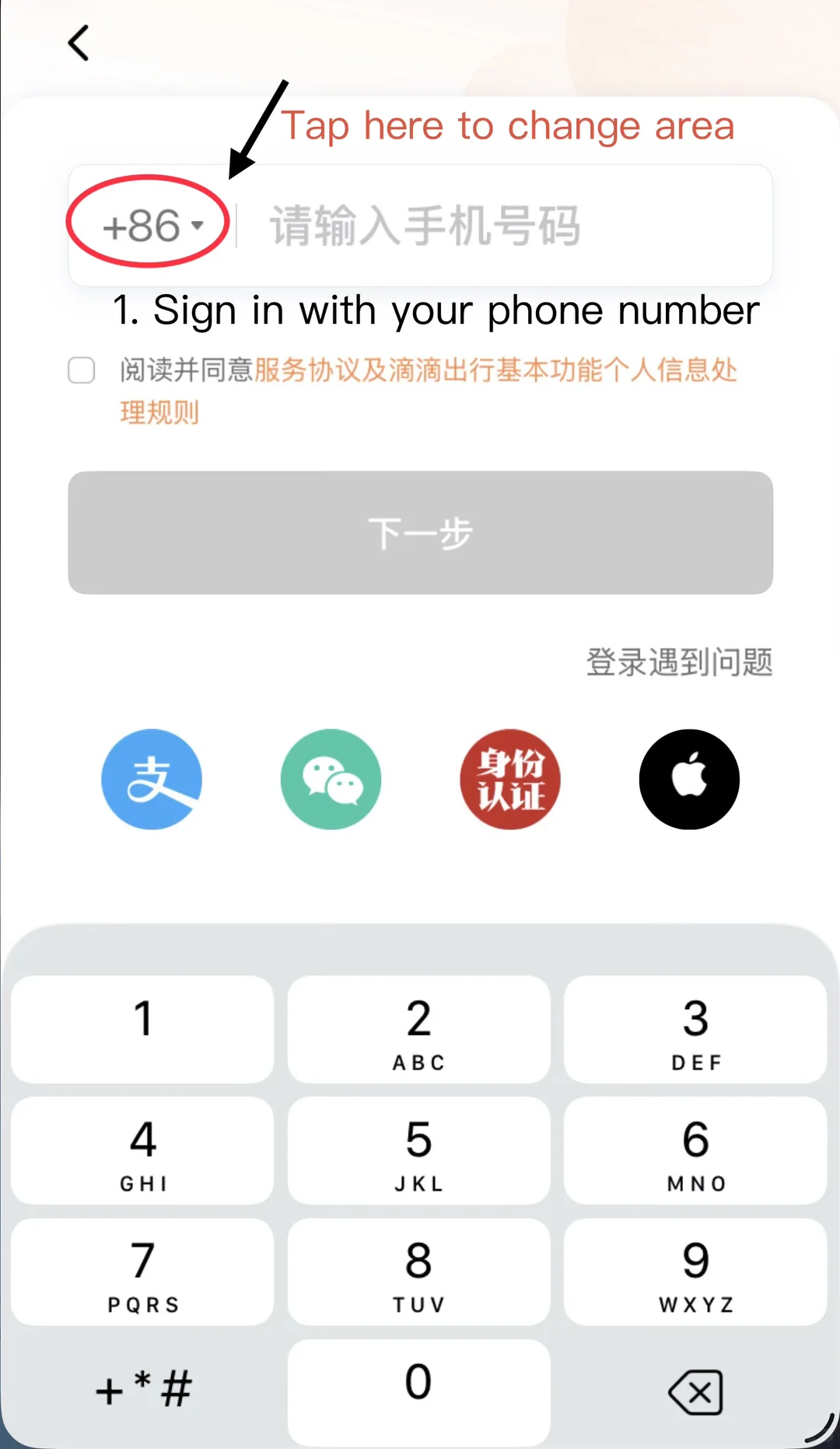
Choose your own country code before entering the number. This community screenshot shows the sign-in control, not a requirement to use +86.
DiDi interface via ChinaAppGuide / Xiaohongshu03
How to add a payment method in DiDi
In the English app, look under Account → Wallet → Payment Methods. Add a supported international card or choose an available Alipay or WeChat Pay option. If the app asks you to authorize automatic payment, read the details and complete that step. A payment method visible in one app is not necessarily authorized in another.
Check the fare and the payment method attached to the actual service you choose. Express, a metered taxi, Premier and larger vehicles can have different prices and payment arrangements. You do not need to buy a prepaid membership card just to make an ordinary ride request.

Wallet is the place to check payment before booking. My Trips and Help are useful if a fare or lost item needs attention later.
DiDi interface via ChinaAppGuide / Xiaohongshu04
How to set your DiDi pickup point and destination
Open the hotel’s Chinese name and street address and paste them into the destination search if the English results are unclear. Check the map and branch address before selecting. Including the branch name helps distinguish hotels in the same chain.
Next, inspect your pickup pin. GPS can place it across a divided road, behind a building or at a mall’s delivery entrance. Walk to a legal, accessible pickup point and choose that entrance or marked location. At a large station or airport, read the app’s terminal, level and pickup-zone instructions instead of dropping a pin on the middle of the building.
Reach the pickup point before requesting the car. If you need to move after a driver accepts, update the pickup location or message the driver with the new entrance.
05
Choosing a car and checking the estimated fare
Choose a service that fits your passengers and bags. Standard cars have limited luggage space; a bigger group or bulky cases may need a larger vehicle. Check the listed passenger capacity and luggage space before choosing.
Review the displayed estimate, waiting time and fare conditions. Some screens select several service types to find a car faster; check which ones you are agreeing to request. A pooled or shared option also changes the journey. An estimate can change with the route, tolls, waiting or other charges shown in the fare rules.
After confirmation, watch for the assigned driver, license plate, model and arrival estimate. If the search is taking too long and you have a train or flight to catch, check the nearest official taxi queue or ask hotel staff for help.
06
How to find and message your DiDi driver
Open the trip’s message area. DiDi offers English–Chinese messaging support; simple, specific messages are easier to translate than a paragraph. Give the entrance name, pickup-bay number or the letters and numbers on the nearest car-park pillar. A photo of the sign can make the location much clearer.
If the driver calls and you cannot follow, return to the trip chat and ask to communicate there. You can show a hotel doorman or airport attendant the active booking and ask for help locating the assigned area. Do not send a verification code to a driver or someone offering to fix your account.
Before getting in, match the license plate and vehicle details in your app. The driver may ask for the last four digits of the registered phone number to confirm the passenger; have them ready on screen if speaking is difficult. Those digits are different from a one-time login or payment code. Use a seat belt and check that the destination on the active trip is correct.
07
Paying for your ride and getting help with trip problems
At the destination, check the final trip status and fare. If you authorized automatic payment, the completed trip should show the payment status. If the app asks for payment, use the order’s own payment or help route and check what remains outstanding.
If the car cannot find you, send the exact pickup marker and compare it with the assigned point. If you need to cancel, read the cancellation screen and any fee before confirming. For a lost item, incorrect charge or a driver problem, open that trip under My Trips and use Help so support can identify the journey.
Still stuck? When login, payment or mobile data will not cooperate, ask reception to arrange a car or use an official taxi queue. Confirm how you will pay before leaving. You can sort out the account from the hotel instead of on a roadside with luggage.
Frequently asked questions
- Do drivers speak English?
- Some do, but plan to use the destination already in the booking and in-app messages. A clear entrance or bay number usually helps more than trying to describe a large building over the phone.
- Can I use DiDi with a foreign phone number?
- Yes, overseas-number registration is supported. Keep that number able to receive the login text and make sure your travel phone has data during the ride. A data-only eSIM does not replace the registered number.
- Is every DiDi a car with a DiDi logo?
- No. Cars and services vary. The green vehicle pictured here is one example. Use the license plate and vehicle details in your own booking, not the paint color or a logo, to identify your ride.
Before you travel: Menus, supported payments, vehicle types and pickup arrangements vary by app version, account and city. The screenshots illustrate interface controls rather than a completed ride test. Use the live trip’s fare and pickup instructions.