Payments · Mainland China
Alipay or WeChat Pay verification failed? What to try next
You have the app and your passport ready. Then the same error appears again. Here’s how to work out which check is stuck and get back to planning your trip.
By TravelPalPal · Updated October 21, 2026 · 7 min read
The short answer
Start with the screen that failed: your passport, a text message, your bank card or an account restriction. Each needs a different fix. You can register with a foreign phone number and use a supported foreign card for merchant purchases; a mainland bank-card prompt needs a closer look at the function you opened.

Two ways to pay at the counter. It is worth setting up a backup before you fly.
N509FZ / Wikimedia Commons · CC BY-SA 4.001
Identify the verification step that failed
Keep the error on screen long enough to read it. “Verification” can mean proving who you are, confirming a phone number, approving a card with your bank, or unlocking an account. Reinstalling the app does not tell you which one went wrong.
If you can open the app but cannot finish a passport check, start below. If the account is ready and only one shop payment fails, check the card and transaction instead. The cashier does not need you to repeat your entire registration.
| What you see | Where to start |
|---|---|
| Passport rejected, name mismatch or face check failed | Review the document and identity details. |
| A verification code never arrives | Check which number the app or your bank is texting. |
| Card linking stops at bank approval | Open your banking app and check the issuer’s request. |
| Account restricted or a security review is required | Use the review option attached to that warning. |
02
How to fix passport and face verification problems
Choose your actual country or region and Passport as the document type. A box labelled 身份证号码 that expects 18 characters is asking for a mainland Chinese ID number. Look for the document selector instead of squeezing a passport number into that box.
Follow the name fields on the screen: surname in the surname field, given names in the given-name field. Use the spelling in your passport, including the requested middle names. Do not invent a Chinese name or keep changing the order at random. A mismatch with an old profile or a renewed passport is something to raise with support.
1Take a clear photo of your passport information page
Place the passport on a flat surface in even light. Keep all four corners and the machine-readable lines at the bottom visible. Move the light or phone if the laminated page reflects glare; avoid flash and filters.
2Enable the camera for face verification
Allow the app to use the camera, clean the lens and face the light. Remove sunglasses and follow the on-screen movements. Keep the phone steady rather than chasing the face outline.
3Check the error message or review status
If you changed a clear problem, retry. If the same message returns or a review is already pending, keep the error and use the app’s help route. Repeating an unchanged submission gives you little new information.
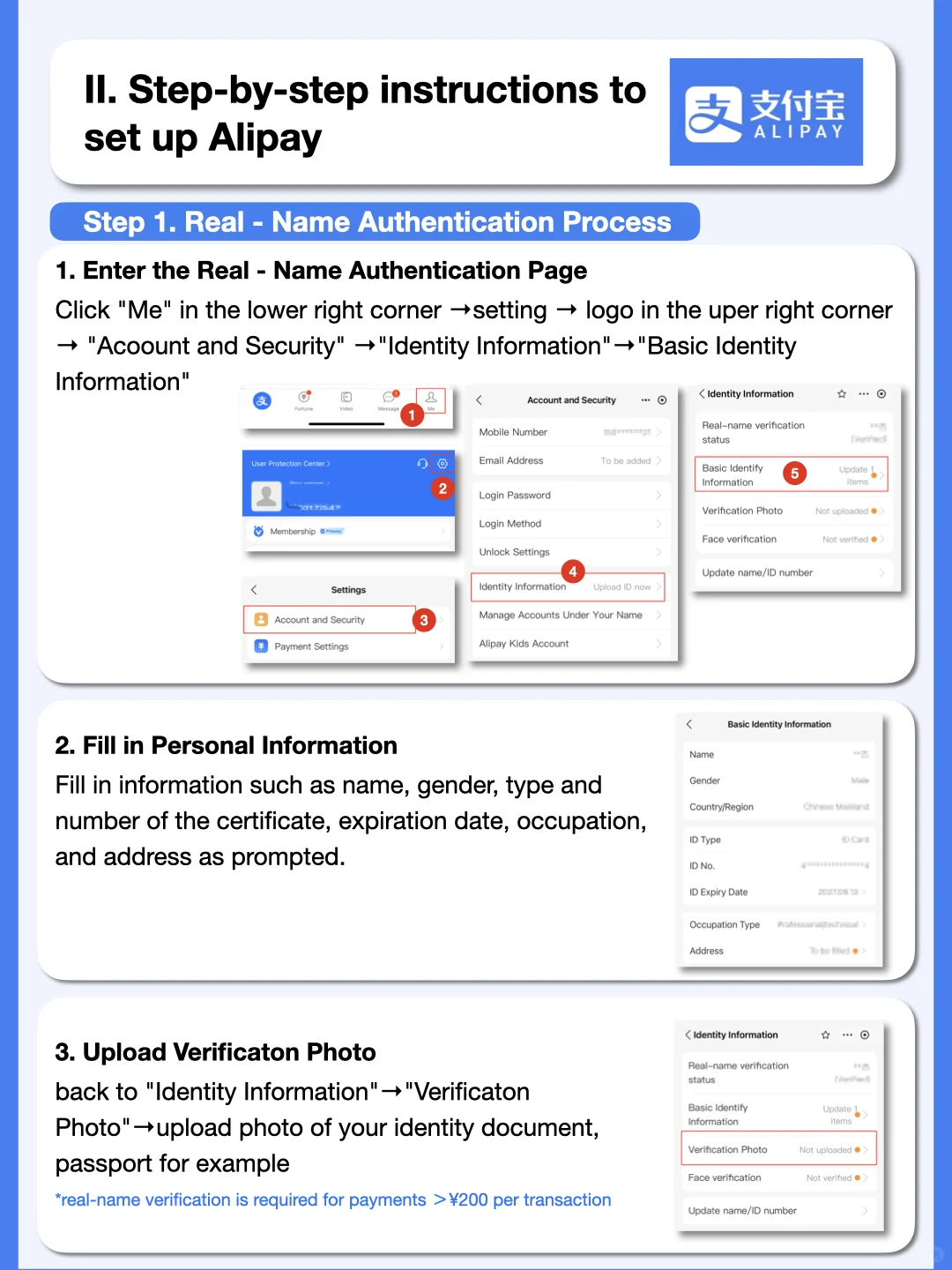
Look for Identity Information under Account and Security. This older example shows the menu location; choose your own country and passport in the live form.
Alipay screens via ExploreChinaNowIf your phone offers a passport-chip check, it is reading the chip in an e-passport, not scanning a QR code. Follow the placement diagram, remove a thick phone case and hold still while it reads. If your passport or phone cannot complete that method, use another method offered on screen or ask support what is available for your document.
03
What to do when a verification text does not arrive
There are two common senders. Alipay or WeChat sends a code to the number used for that account. Your card issuer sends its own approval to the phone number or banking app registered with the bank. Receiving one does not prove the other is working.
Check the country code and the digits on the screen. Keep your home SIM enabled and confirm with your carrier that it can receive texts abroad. Your travel eSIM can supply internet while the home line receives SMS; a data-only eSIM cannot receive a code addressed to your home number.
Look in blocked or filtered messages, wait for the resend timer, then request a fresh code. Use the latest code rather than an earlier one that arrived late. If ordinary texts work but this sender never gets through, ask the carrier about verification-message delivery or use another verification method the app offers.
04
What to do if your bank rejects card linking
If you reached the bank approval screen, open your banking app before changing your passport details. There may be a pending approval, a fraud alert or an online-purchase setting to review. Enter the cardholder details requested by the issuer and check the expiry date and security code.
Use a supported card in your own name. If the issuer declines the link, ask it about the attempted Alipay or WeChat Pay authorization, with the approximate time. A second card from another issuer is useful when the first bank cannot resolve it quickly.
An abbreviation printed on a card is not a reason to rewrite your legal passport name. Keep identity details accurate and let the bank or payment provider explain a mismatch. Once a card is saved, complete any separate identity task still shown in the app.
05
Why Alipay or WeChat Pay asks for a Chinese bank card
First check whether you opened wallet top-ups, transfers, red packets or another account feature. Those are different from paying a shop directly with a foreign card. Having an empty balance does not mean you need a friend to transfer money into the account.
If the mainland-card request blocks identity verification itself, return to the identity page and check the country and document selections. If there is no passport route, keep the exact prompt and ask the app’s support to review it. Some visitors encounter this even after uploading a passport; there is no universal button sequence that fixes every account.
For WeChat, a request for another user to assist with account registration is also separate from WeChat Pay passport verification. Follow that account’s own instructions. Paying a stranger to “verify” you is a poor substitute for the official route.
06
Contacting support and using another payment method
For Alipay, open the in-app Help or Customer Service entry. For WeChat Pay, open Me → Services → Wallet and look for Help Center. Menu labels can differ, so start with the screen connected to the failed check.
Send the exact error and explain which step failed. If support needs a document, upload it through the official in-app process. Ask what action is needed and whether a review is already in progress; do not plan around a promised same-day fix from a travel blog.
Meanwhile, prepare the other payment app, a physical bank card and some RMB cash. Check how you will pay for the journey from the airport and the first hotel. Getting dinner and reaching your accommodation matter more than solving every wallet feature before departure.
Frequently asked questions
- Do I have to buy a Chinese SIM to pass verification?
- No. Both apps support registration with overseas numbers. A Chinese SIM can help with local calls and services, but it does not fix incorrect identity details or a blocked bank authorization.
- Does “verified” mean every payment will work?
- No. Your bank, the merchant’s checkout and the transaction type still matter. Try a small merchant purchase after arrival, and check the actual error if it fails.
- Should I delete the account and start again?
- Ask support first, especially if the account holds money or has a pending review. A new account does not resolve the reason the original check failed and can leave the old problem harder to track.
Before you travel: Verification methods depend on your account, document, location and app version. Follow the current in-app instructions. The illustrated menus are from an earlier version; payment providers and card issuers decide approvals.